Colocalization
Colocalization analysis of multi-channel images
napari-colocalization







⚠️ Under construction - pre-alpha. APIs, UI, and outputs may change without notice. Not recommended for production analysis yet; use at your own risk and please report rough edges via the issue tracker.
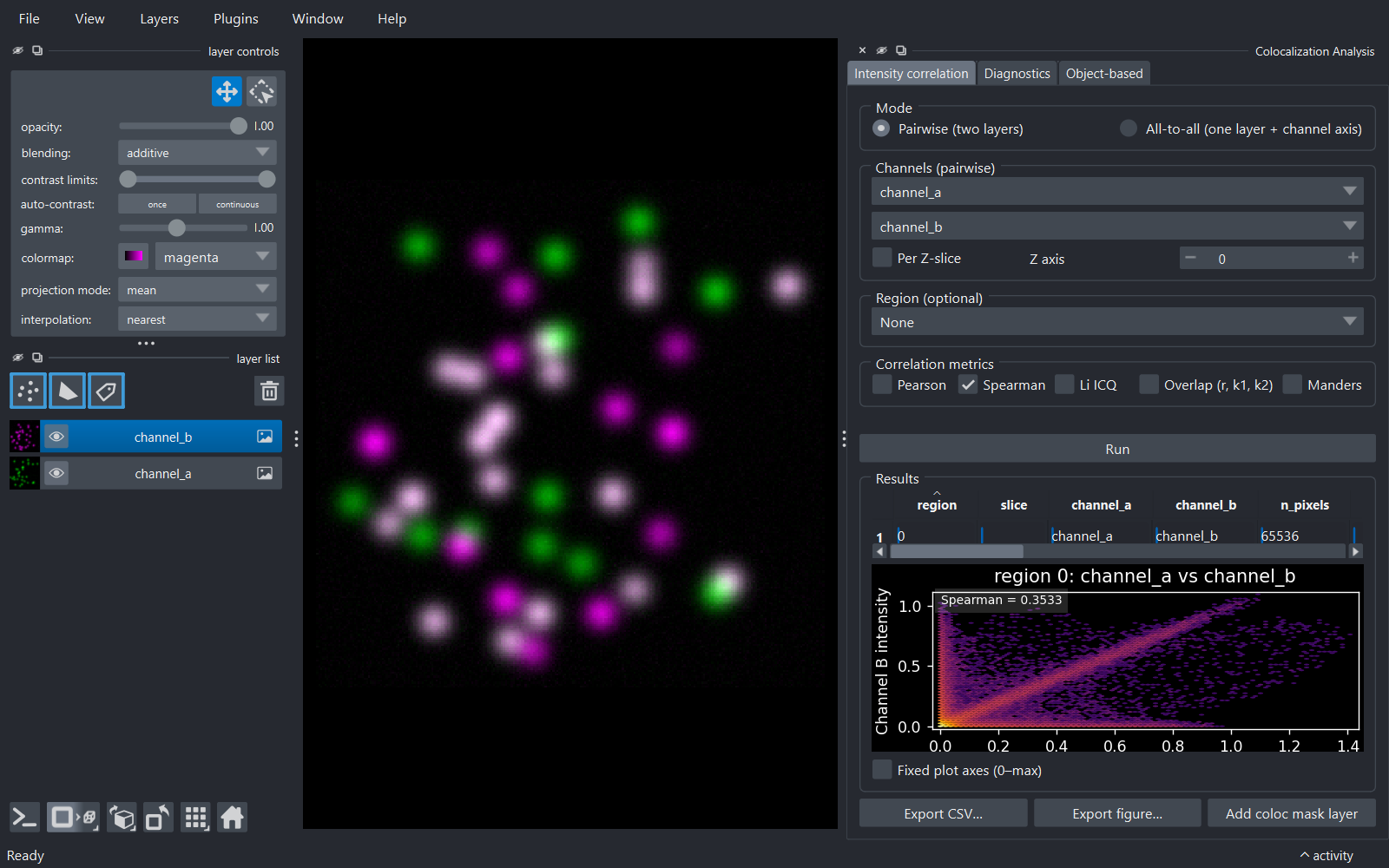
Interactive intensity-colocalization analysis for napari. Pick two channels (or one multi-channel image), optionally restrict the analysis to a region drawn as shapes or labels, choose your metric, and get a results table plus an intensity-vs-intensity density plot.
Features
- Five colocalization metrics, spanning both families: three of correlation — Pearson (PCC), Spearman rank (SRCC) and Li's Intensity Correlation Quotient (ICQ) — and two of co-occurrence — Manders' overlap coefficient with split coefficients (r, k1, k2) and Manders' thresholded coefficients tM1/tM2. Pearson and Manders are on by default, one from each family.
- Pairwise or all-to-all mode: analyse two grayscale layers, or every channel pair within a single multi-channel layer.
- 2D and 3D support natively (no time-series for now).
- Region-restricted analysis via a Shapes or Labels layer - each non-zero region is reported on its own row, computed on that region's bounding-box crop so masks with many regions stay fast.
- Manders thresholds: choose Costes auto (orthogonal-regression bisection, matched to Fiji Coloc 2), a per-channel auto-threshold (Otsu, Li, Triangle, Yen, Mean, IsoData → thresholded tM1/tM2), or Manual.
- Per-Z-slice mode: analyse each plane of a stack separately (one row per slice), à la JACoP B's "consider Z slices separately".
- Interactive results: in-widget table with numeric sorting and per-column header tooltips, density plot of the selected row, multi-row selection that highlights all matching shapes/labels in the viewer, and an optional fixed-axes cytofluorogram for comparable plots. Plots follow napari's light/dark theme.
- Cancellable runs: analysis runs on a background thread with a progress bar; the Run button turns into Cancel while a run is in flight.
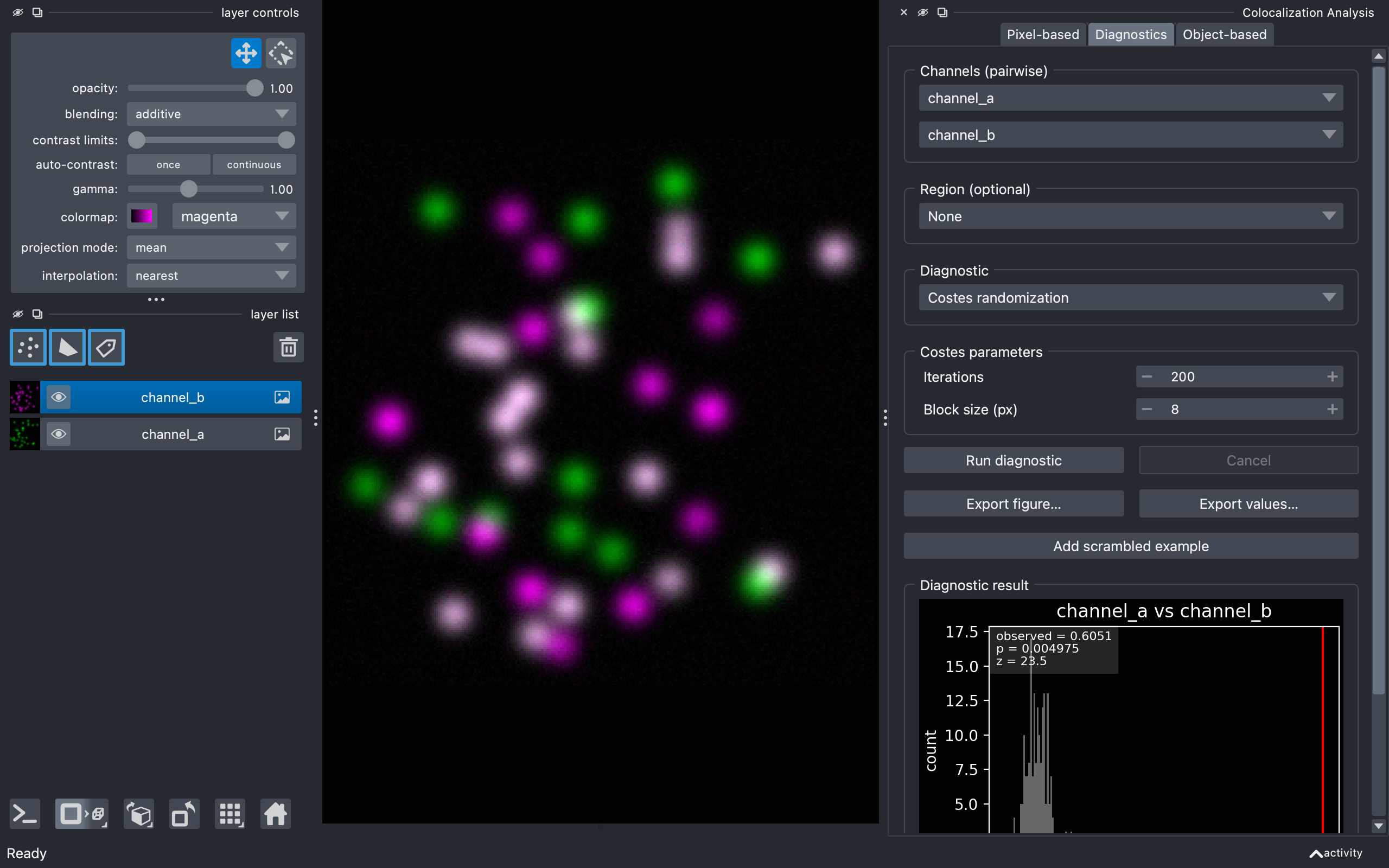
- Diagnostics tab: single-pair diagnostic plots - Costes randomization significance test (observed PCC vs a scrambled null, with p-value/z-score), Van Steensel cross-correlation function (CCF), and Li intensity correlation analysis (ICA).
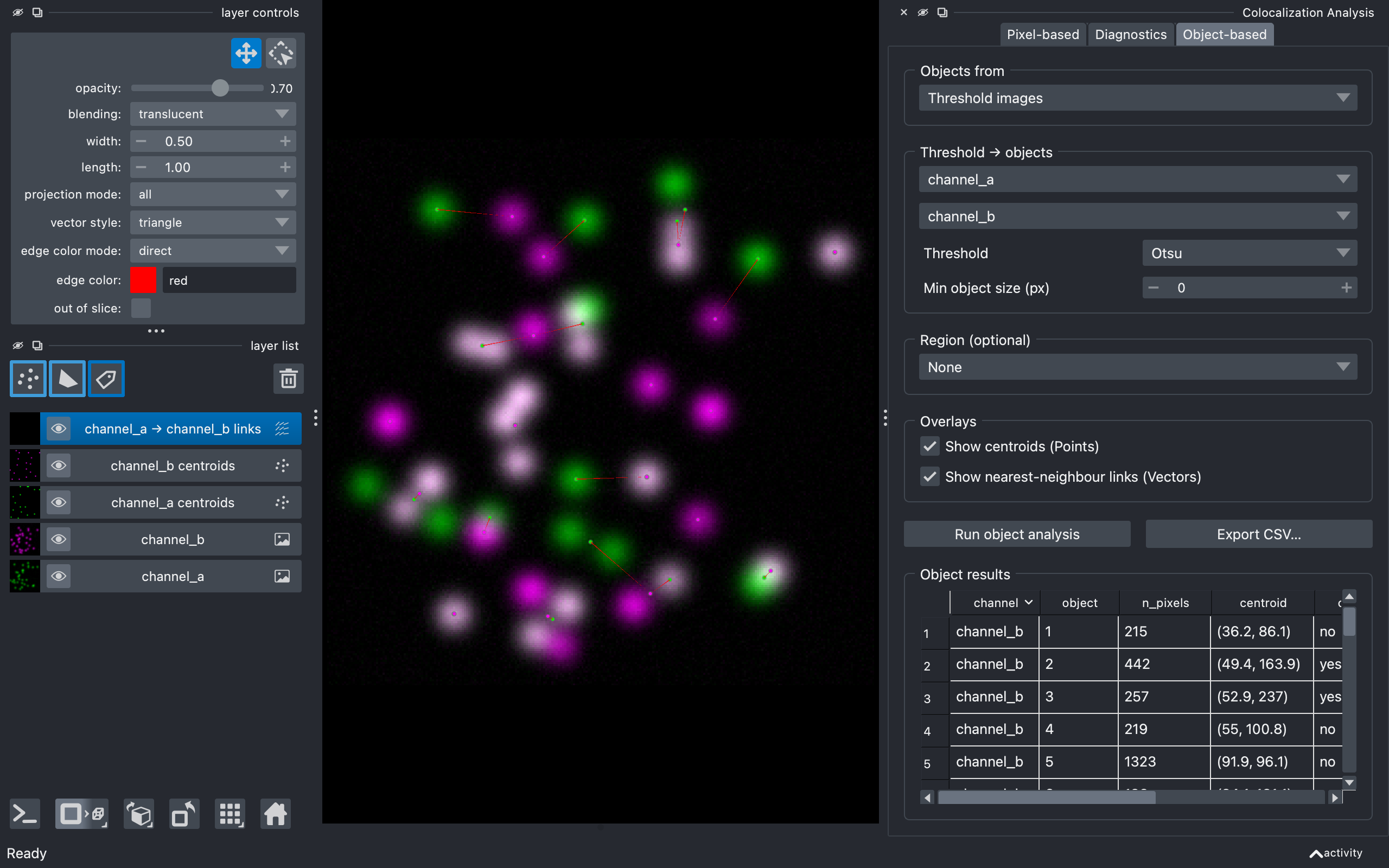
- Object-based tab: compare segmented objects (from Labels layers or by thresholding) - centre-particle coincidence and object overlap per object, with centroid Points and nearest-neighbour Vectors drawn into the viewer.
- Outputs to the viewer: add the colocalized-pixel mask (selected row) as a Labels layer, or a block-scrambled example as an Image layer.
- CSV export of the current table, plus figure export of the density plot (PNG / PDF / SVG / TIFF, configurable size and DPI).
Installation
pip install napari-colocalization
If napari isn't already installed, install both at once:
pip install "napari-colocalization[all]"
For the latest development version:
pip install git+https://github.com/DBI-INFRA/napari-colocalization.git
Quick start
-
Launch napari.
-
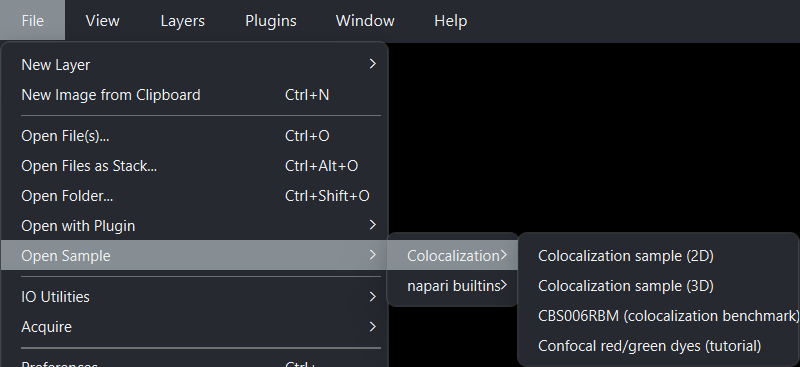
Load sample data: File → Open Sample → napari-colocalization → Colocalization sample (2D). A 3D synthetic sample and CBS006RBM (a two-channel benchmark image from the Colocalization Benchmark Source) are also provided.
-
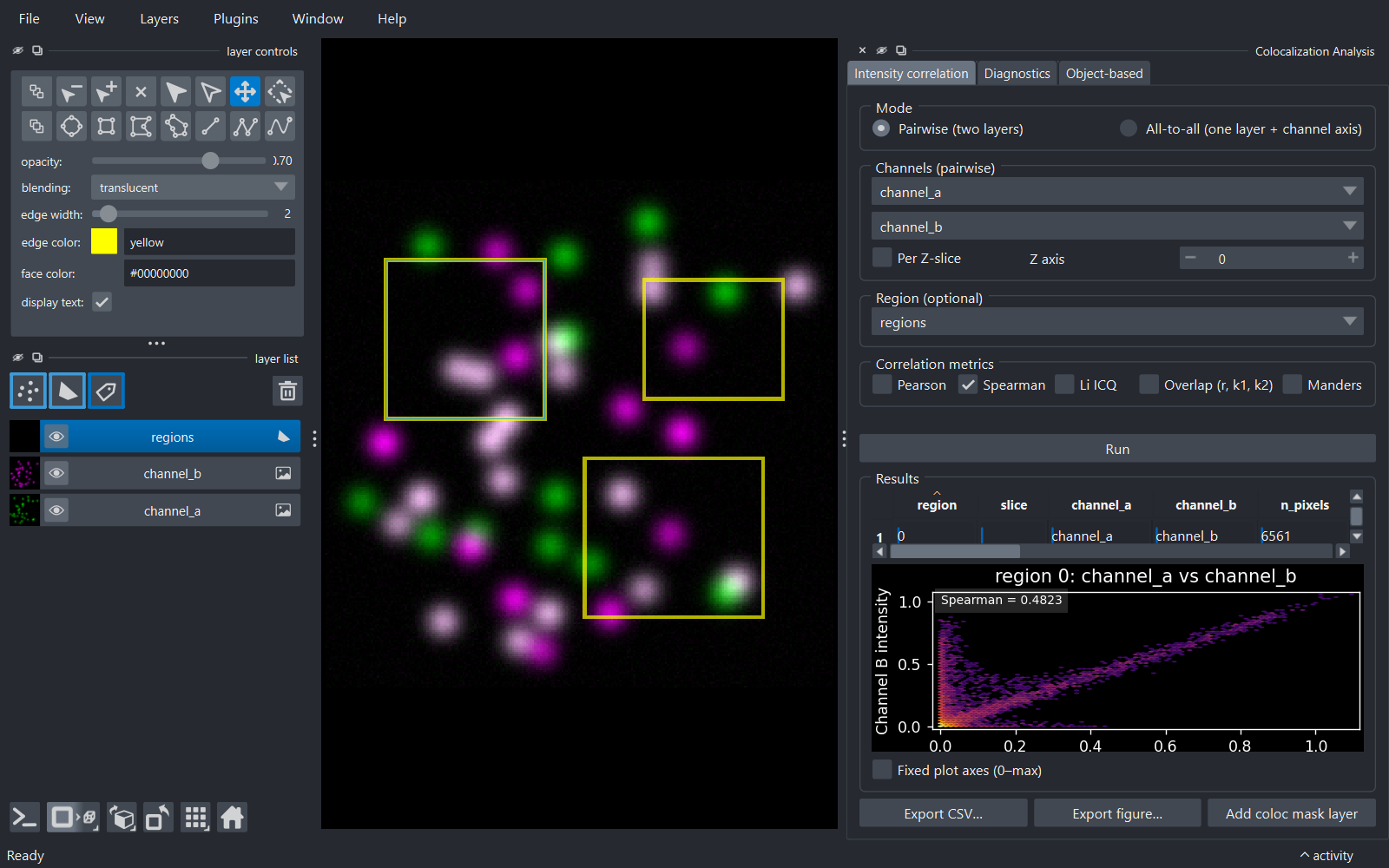
Open the widget: Plugins → Colocalization Analysis. Two image layers
channel_aandchannel_bare auto-selected for pairwise mode, with Pearson and Manders checked and the Manders threshold group (Costes (auto)) below them. -
Click Run. A progress bar tracks the run - the button reads Cancel until it finishes. The results table then populates with a single row (the whole image), and the density plot below shows the intensity pairs with the metric values overlaid.
- (Optional) Add a Shapes layer, draw a few rectangles or polygons, set Region to Shapes and pick the layer. Re-run - the table now has one row per shape, and clicking a row highlights the matching shape in the viewer.
See docs/usage.md for the full walkthrough.
Diagnostics
The Diagnostics tab runs single-pair diagnostic plots that go beyond a single number per region: the Costes randomization significance test (the observed PCC against a block-scrambled null, with a p-value and z-score), the Van Steensel cross-correlation function, and Li's intensity correlation analysis. The randomization test is where significance comes from: the results table reports coefficients only, since per-pixel correlation p-values are not valid on spatially autocorrelated image data (details).
Object-based analysis
The Object-based tab compares segmented objects between the two channels: centre-particle coincidence (does an object's centroid fall inside an object of the other channel?) and object overlap, with one row per object. Objects come from existing Labels layers or by thresholding, and the detected centroids and nearest-neighbour links are drawn back into the viewer as Points and Vectors.
Documentation
- Usage guide - every control in the widget, in order.
- Metrics - what PCC, SRCC, ICQ, the overlap coefficient and Manders (tM1/tM2) mean, co-occurrence versus correlation, and how the Costes auto-threshold works.
- Python API - calling the pure-compute layer
(
pearson,spearman,li_icq,manders,overlap,costes_threshold,costes_regression,analyse_pairwise,analyse_all_to_all) from scripts or notebooks. - Changelog - what changed in each release.
Related projects
- Coloc 2 - the reference ImageJ colocalization plugin; this plugin follows it in spirit, and the Costes auto-threshold here is matched to its implementation.
- JACoP - "Just Another Colocalization Plugin" (Bolte & Cordelières, 2006); the inspiration for the diagnostics (Van Steensel CCF, Li ICA, Costes randomization) and the object-based analysis.
- ijp-jacop-b - the BIOP fork of JACoP; inspired the per-channel auto-thresholds, per-Z-slice mode and the layers written back to the viewer.
- scikit-image colocalization metrics: the underlying implementations of PCC and Manders.
Contributing
Contributions are welcome. Run the test suite with:
pip install -e . --group dev
python -m pytest tests/ -v
Pre-commit hooks (ruff lint + format, napari-plugin-checks) ship with the repo:
pre-commit install
pre-commit run --all-files
Please keep test coverage at or above the current level when submitting a PR.
License
Distributed under the terms of the MIT
licence; napari-colocalization is free and open-source software.
Issues
Found a bug or have a feature request? Please open an issue.
Version:
- 0.3.1
Last updated:
- 2026-08-31
First released:
- 2026-04-30
License:
- MIT
Supported data:
- Information not submitted
Plugin type:
Open extension:
Save extension: