Carltonlab Count Tool


A napari plugin for manual and automated foci counting in microscopy images, developed for RAD-51 foci in C. elegans gonads.





About the plugin
Work in progress, please expect bugs V0.1.0
This napari plugin is a tool designed to computationally count the number of foci in microscopy of C. elegans gonads. It has two operational methods, manual and automatic counting. It uses ndevio to extract the required metadata and multiview-stitcher to stitch the gonad tiles into a single image.
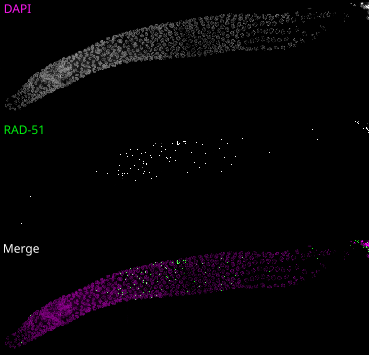
The tool was designed for RAD-51 foci counting in 4D images (CZYX) since it is the most common assay for quantification of DSBs in C. elegans but can be used to count other foci in any image.
It features multi-gonad project creation where all genotypes and gonads are mixed after individual nuclei are selected (manual or automatic) and are scored in a blind manner to minimize human bias.
We recommend using the automatic process, which uses a trained cellpose model to segment the
nuclei. By default, it uses our trained model:
https://bioimage.io/#/artifacts/sneaky-panda.
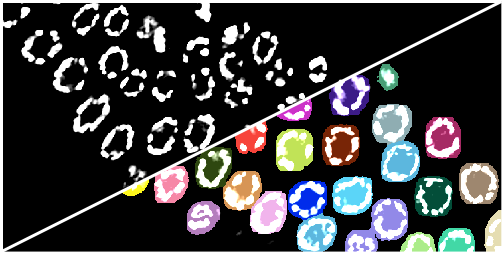
For the automatic counting, it uses spotiflow with a default model and then point filtering
based on user provided parameters such as expected foci volume, channel (usually DAPI)
co-localization and more.
It'll export the data as plots that can be organized by genotype similar to the conventional RAD-51 scoring figures commonly used in papers.
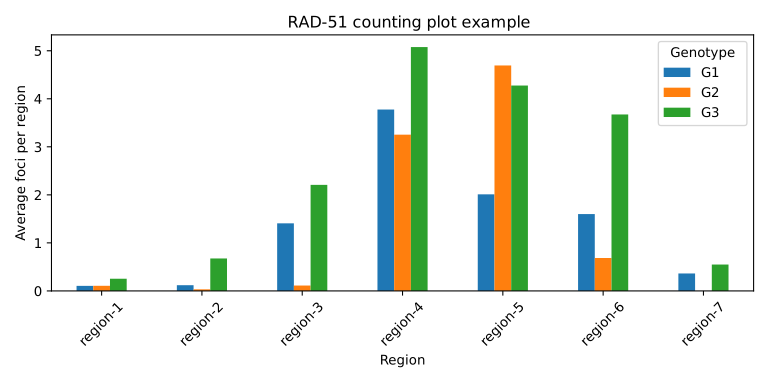
It also writes all the intermediate files for troubleshooting, data archive and manual inspection.
Formats are OME-Zarr for tiles and stitched images, TIFF files for cropped nuclei, CSV files
for foci coordinates and feature tables. All which are easy to inspect even without the tool.
You can also do the entire counting and refinement of the data using the manual process.
Installation
Install from PyPI or napari Hub
Install the plugin in napari:
-
In napari, open Plugins → Install/Uninstall Plugins…, search for
carltonlab-napari-tools, select it, and click Install. Restart napari if prompted. -
If Install/Uninstall Plugins… isn't available, install the napari plugin manager in the same environment as napari.
-
Or, in the Python environment used by napari, run:
python -m pip install carltonlab-napari-tools
The commands above install the plugin's base dependencies. For automatic segmentation, install the matching extra in the same Python environment:
For CPU:
python -m pip install "carltonlab-napari-tools[full-cpu]"
For CUDA 12:
python -m pip install "carltonlab-napari-tools[full-cuda12]"
Depending on your system, you may need a different PyTorch build for CUDA.
Install from source
Clone the repository and enter its directory:
git clone git@github.com:carltonlab/carltonlab-napari-tools.git
cd carltonlab-napari-tools
Select what segmentation you'll be using (Automatic workflow only).
For the manual workflow, install napari and Qt without the segmentation models:
uv sync --extra all
For automatic segmentation on CPU, use:
uv sync --extra full-cpu
For automatic segmentation with CUDA 12, use:
uv sync --extra full-cuda12
We highly recommend using a GPU for the segmentation. Depending on the setup, you might need to
install a different PyTorch version.
For our workflow, with approximately 2 × 50 × 1024 × 1024 (CZYX) images, segmentation and foci counting use about 6 GB of VRAM.
Running
Launch napari from the environment where you installed the plugin:
- If you installed it through napari's plugin manager, pip, or conda, launch napari as you normally do.
- If you installed from source using uv, run this from the repository directory:
uv run napari
Then, use the Plugins menu to launch the tool.
Contributing
Contributions are very welcome.
Acknowledgements
This plugin uses ndevio for image metadata and multiview-stitcher for image stitching.
If you use multiview-stitcher in published research, cite its
Zenodo record.
License
Distributed under the terms of the BSD-3 license, "carltonlab-napari-tools" is free and open source software
Version:
- 0.1.0a1
Last updated:
- 2026-09-28
First released:
- 2026-09-28
License:
- Copyright (c) 2025, Carlos Rod...
Python versions supported:
Operating system:
- Information not submitted
Requirements:
- napari
- numpy
- matplotlib
- magicgui
- qtpy
- scikit-image
- ndevio
- bioio-tifffile
- bioio-dv
- multiview-stitcher>=0.1.37
- mrc
- tifffile
- pandas>=2.2.3
- scipy
- dask
- platformdirs
- superqt
- zarr
- bioimageio-spec>=0.5.14.2
- napari[all]; extra == "all"
- cellpose; extra == "segmentation"
- spotiflow; extra == "segmentation"
- torch; extra == "segmentation"
- cupy-cuda12x; extra == "gpu-cuda12"
- napari[all]; extra == "full-cpu"
- cellpose; extra == "full-cpu"
- spotiflow; extra == "full-cpu"
- torch; extra == "full-cpu"
- napari[all]; extra == "full-cuda12"
- cellpose; extra == "full-cuda12"
- spotiflow; extra == "full-cuda12"
- torch; extra == "full-cuda12"
- cupy-cuda12x; extra == "full-cuda12"